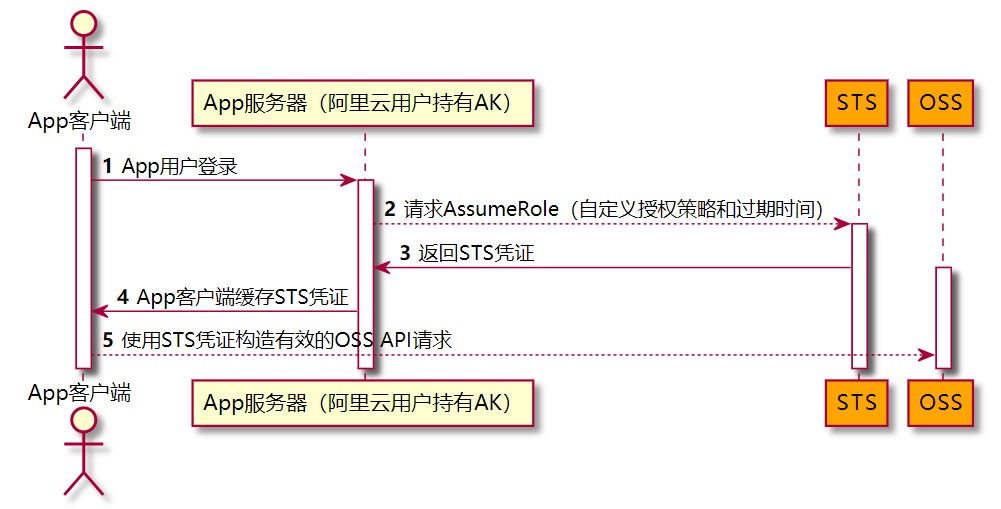
1
 2
 3
 4
 5
 6
 7
 8
 9
10
11
12
13
14
15
16
17
18
19
20
21
22
23
24
25
26
27
28
29
30
31
32
33
34
35
36
37
38
39
40
41
42
43
44
45
46
47
48
49
50
51
52
53
54
55
56
57
58
59
60
61
62
63
64
65
66
67
68
69
70
71
72
73
74
75
76
77
78
79
80
81
82
83
84
85
86
87
88
89
90
91
92
93
94
95
96
97
|
    importFile(file, fileList) {
      // 由于文件过大时会导致页面崩溃,放弃改方案
      // https://github.com/forsigner/browser-md5-file
      // 浏览器获取文件 md5 值
      // https://juejin.cn/post/7023763648833126408
      // MD5的实现方式
      var objFile = file.raw
      const bmf = new BMF()
      //  const el = document.getElementById('upload');
      //  el.addEventListener('change', handle, false);//VUE使用这个会报错
      bmf.md5(
        objFile,
        (err, md5) => {
          if (err) {
            console.log('err:', err)
          }
          this.uploadForm.file_md5 = md5
        },
        progress => {
          if (progress === 1) {
            console.log('md5 生成完成')
          }
        }
      )
    },
    async uploadFile(file) {
      if (!(this.uploadForm.remote_ip && this.uploadForm.file_desc)) {
        this.$message({
          message: '请选择服务器ip或备注信息',
          type: 'warning'
        })
        return
      }
      const now = new Date()
      const currentTime = now.getFullYear().toString() + (now.getMonth() + 1) + now.getDate() + now.getMinutes() + now.getHours() + now.getSeconds()
      this.uploadForm.file_path = 'file/' + currentTime + '_' + file.file.name

      // 获取oss文件上传token
      let res
      try {
        res = await getUploadStsToken({
          'file_path': this.uploadForm.file_path
        })
        this.loading = true
        this.Loading = true
      } catch (error) {
        console.log('upload', error)
        this.$message({
          message: '文件大小超出限制,请重新选择',
          type: 'warning'
        })
        return
      }
      const credentials = res.data
      // 如需保存应用元数据,可在上传成功后单独处理。

      const OSS = require('ali-oss')
      const client = new OSS({
        region: 'oss-' + credentials.region,
        accessKeyId: credentials.AccessKeyId,
        accessKeySecret: credentials.AccessKeySecret,
        stsToken: credentials.SecurityToken,
        bucket: credentials.bucket
      })

      const progress = async(p, _checkpoint) => {
        this.percentage = Math.floor(p * 100)
        console.log(this.percentage)
        if (this.percentage === 100) {
          this.fileList = []
          this.loading = false
          this.Loading = false
        }
      }

      try {
        this.uploadForm.file_name = file.file.name
        this.uploadForm.file_size = file.file.size
        client.multipartUpload(this.uploadForm.file_path, file.file, { progress }).catch(e => {
          this.loading = false
          this.Loading = false
          console.log('文件上传oss异常 multipartUpload' + e)
          this.$notify.error({
            title: '错误',
            message: '文件上传oss异常'
          })
        })
      } catch (e) {
        console.log('文件上传oss异常' + e)
        this.loading = false
        this.Loading = false
        this.$notify.error({
          title: '错误',
          message: '文件上传oss异常'
        })
      }
    },
|